joi, 23 august 2012

Android Launcher keeps restarting

When your phone runs out of RAM, automatically stops one or more applications that are currently running, making use of the newly gained resources for currently running apps.

The problem here is that my mid end phone stops the Home app, aka Launcher. I’ve used several launchers like Launcher Pro, Nemo, ADW (?) and others, and having the same problem. So I found that I can prevent the home app from being stopped by locking it in memory. You can do that (if you have a custom ROM installed) by going to Settings –> CyanogenMod Settings –> Performance , then select Lock home in memory.


screenshot-1345755131131

Thanks to Google and XDA forums for this fix.

Standard ROMs should not have this problem.

Reading books on today’s touchscreen devices

First of all, nothing beats reading a physical book.

But some books are hard to find, therefore I must use the power of Google and get my book in digital format. Then I have to use my smartphone to read it.

I use Moon+ Reader and I find this app the best one (so far) for reading. It’s very complex and yet very easy to use. Text is highly customizable and page turning is smooth.

Screenshots:

screenshot-1345716610429
Now read!
screenshot-1345717493538
Some books I have imported
screenshot-1345716674485
Statistics about your reading. Unfortunately, if Moon+ Reader is running while phone is charging, app still records data. I don’t read that much.
screenshot-1345716679384
Same statistics

You need to buy the full version of Moon+ Reader to record data about your reading habits. But , given the fact that I screwed my statistics just by keeping the screen on while charging, I think free version should bee just fine.

I have also used Aldiko Book Reader and ePub Reader. First one was good, but not as good as Moon+ and the second one was bad and often turns like 5 pages at a time for no reason.

vineri, 27 iulie 2012

Youtube mobile–play videos on other devices

As of latest version (2.5.16), youtube’s official mobile app gives you the opportunity to play any video on any Youtube capable device . You just need to be logged in to Youtube on your mobile and on  your TV or PC or whatever.

screenshot-1343413803451

If your devices are paired, you should see the remote play icon on your mobile app. Press it and the video will start playing on the other device. In less words this is a Youtube remote.

Go to youtube.com/leanback and click on that play remotely icon to pair your devices.

Also, with this latest update, videos won’t play in HQ on my mobile phone. I did select “play HQ when available” in the settings menu, but nothing happened. maybe it’s me, maybe it’s Jewtube

miercuri, 4 iulie 2012

Android Game Boy Emulators

I don't usually play games on my phone, but when i do, i play Game Boy games. I still can't belive i lost 19 hours of my life with a Pokemon game.
 This is Pokemon Gold and you can play it with a free emulator found in Android Market: Gameboy Color A.D.  . It's very easy to use and does not need any aditional files to run (like bios, crack, etc.


This screenshot  is from Final Fantasy VI for Game Boy Advance. I didn't played it too much , but it can't be bad, i like most of the FF titles. This one needs another emulator, like GameBoid and a bios file. I don't remember where i got this file but it must be easy, like Google search easy.


You can find games for these emulators all over the internet but i preffer http://www.freeroms.com/ .
If you feel like playing something else besides Angry Birds, try these classics, you wont regret.

vineri, 20 aprilie 2012

Remove Gom Player ads

After Gom Player's latest update (not really latest, but meh ) I noticed that every now and then i get a pop-up ,after closing the main window, with some ads. It's pretty annoying, if i wish for ads i'd use BSplayer or something.

How do you remove them? Pretty simple: download a new skin for the program. I'm using WMP12X for no reason.


Capture incomplete because touchpad too short

After 1 and 1/2 days, i get no ads. I'm not sure if you can get same results by using standard skins.

luni, 19 martie 2012

Total Commander for Android

For a better use of your Android phone , you really need a good  File Manager. I've tried several (OI, Astro, etc) but i think Total Commander is the best one there is.
As you see above, you can work with 2 panels. For example, chose one file from the right panel and then copy to the  left one. This way you can almost organize your Directory List or even sort files correctly.

I said almost because every Android app creates a folder in your SD card for some reason. I hate that.
You can download this app from this page

sâmbătă, 25 februarie 2012

Scumbag PS2

So i got a  used PS2 with no games. The guy who gave it away said that the console is hacked with some chip and it will run any game "bought" online .
The day after i bought like 20 blank dvd's and i began downloading and burning  like a ton of games. The big surprise was that no disc was good enough to play an entire game. Some fail to start, some fail to load in game and other are not read at all by the PS2.
After that, i bought other DVD's , 2x more expensive (still cheap, though) and i was very surprised that every game was playable.
TL;DR : Use quality DVD-R for backing up your PS2 games, the console is VERY picky regarding that ort of thing.

vineri, 17 februarie 2012

Start Menu Library Shortcut Edit - Windows 7

So i use my Start menu to open Windows Explorer and browse for files. Click on any shortcut from top-right section then navigate by using back, up, etc.
Next i'll show you how to change those predefined folders with some of your own.

1. Open Start Menu and pick one of those folders. I've selected the Documents for editing because who uses Documents anyway?

2.  Next, right click the folder and the select Properties, a new window will appear. Remove all library locations (because you won't need them anymore). 

3. After that, press the Include a folder button and select the one that you want to have a quick access to.
You will want to select Optimize this library for General items because thumbnails and stuff


And you're done. Now you can quickly jump to your favorite folders.

vineri, 6 ianuarie 2012

Num Lock always ON on Ubuntu? NO!

So i have at home windows 7 on my PC. After every fresh install, Num lock is by default off, but after 2-3 NL pressing is stays ON until i press NL again. Same goes for Windows XP.
Well, at work in have Ubuntu and Num Lock does not stay ON. How can i change that?
After a brief google search, i for one can't . I mean... seriously , do i have to write down some sort of shell script and then add it to start-up? http://ubuntuforums.org/showthread.php?p=11503271
Come on Ubuntu, get your sh*t together!

luni, 5 decembrie 2011

Something about Android battery life

I use Windows on my personal PC & netbook , Linux at my work-PC and Android runs on my mobile phone. So, form now on i will provide some tips about all those platforms. Period.

The number one problem with smartphones in our days is the battery life. These new devices have large touch screens that consume most of your battery and you need to recharge them very often, sometimes more than once a day.
Here are some tips for battery saving:
- Keep your screen on low brightness or select the auto brightness mode. This will save some battery.
- Any applications that's installed on your phone "eats" battery. And by any i mean EVERY application. So think twice before installing some wonder app that helps your battery life. At its best, this app will not drain your battery faster.
For example, i had like 2-3 apps that kept launching themselves even if i closed them. So we have 2 apps running in pasive service mode. I installed some app manager that constantly scans for running services and allows me to kill those who i desire. That results  in one permanently active service that helps me kill the passive ones. That makes no sense to me regarding battery saving.
- Use 2G instead of 3G networks.
- Uninstall System apps that you don't use (Gtalk, maybe email, some HTC or SAMSUNG apps that no one uses, etc) You can do that by using Root Uninstaller, which works only on rooted phones.
Finally, for experienced users, you may want to try some custom ROMs. I'm using the lastest version of GingerDX and this is how my battery life looks:

More to come soon!

marți, 28 decembrie 2010

Eee PC MKV play performance

I have an Asus EeePC 1000H and i use it mostly for watching movies. I have some problems playing MKV video files without the AC plugged in with GOM player with its standard codecs, so i installed aditional codecs. (just google MKV codec) and hit the first link)
The result was acceptable, no more frame freeze/skip , but still there are some sync problmes with the audio/video track.
Hope someone else finds this usefull.

luni, 13 decembrie 2010

Nokia N80 blue LED: turn off / turn on

This thing has nothing to do with Windows , or Linux for that matter, but it's an interesting fact that i figured it out.
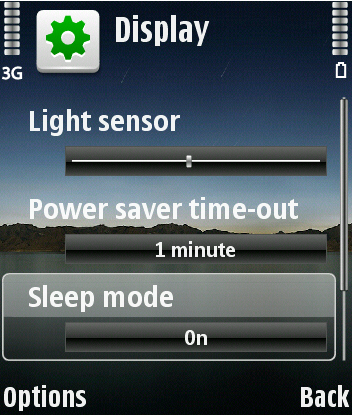
So, if you have a Nokia phone with a flashing blue LED on front, you can witch it off by going to Menu -> Tools -> Settings -> Phone -> Display -> Sleep Mode , then select OFF. This way, your display will show you the time, missed calls, etc.
It's interesting because on my phone this option is available only when Englis language si selected.

marți, 7 decembrie 2010

Webcam record utility

I tried to find a program that records video clips directly from your webcam , but my first search results were spam, more spam and a forum post that learned me to record directly from Microsoft Office Onenote. Unfortunately it has just one setting, and that is regarding the quality of the video, but if you have Microsoft Office installed,  it's right there for you.
Usage: Open OneNote (not that Sidenote from System Tray, then go to Insert -> Recording -> Record Video. I don't know where on the hard drive it saves the file, but after you finish recording you can right click the object and select a path for you new saved file.


Oh, when you press "record", a pop-up will apear with images from the camera. From this point, the recordin si on until you close the window. Neat!

joi, 28 octombrie 2010

Power surge prottection

Sometimes, when there is a voltage spike or power loss, the computers's power suplly protects itself by shutting down. This means you won't be able to turn the computer back on immediately after the power break.
What should you do: pull the power cord, ther press the computer;s power button. This will drain the remaining power stuck in your circutis . Then, plug in the power cable and you;re done.

Well, about Ubuntu

I just erased all Ubuntu partition, i have no patience left for dealing with it.
Anyway, if you have  Ubuntu on a laptopt and it goes to standby, good-bye WIFI connection. You have to kill the process and restart.
How easy is that?

miercuri, 13 octombrie 2010

Turn off Spelling check in Outlook 2010

Just follow these steps.

  1. Click the File tab, and then click Options.
  2. Click Mail , and then click Editor Options.
  3. Click to clear the Check spelling as you type check box. 
Simple as that!

joi, 7 octombrie 2010

24H clock in Windows 7

To enable 24h clock , go to Control Panel -> Region and Language -> Formats tab -> Aditional settings -> Time tab. Next, switch both Short time and Long time to HH:mm (Capital H).
Apply and you're done.

marți, 5 octombrie 2010

Change Windows 7 Logon Screen

The stantard Logon screen can be changed, if you wish to. Follow these steps (as seen here ) :

1. Download the registry file from here. Extract the file and double-click on the file to enable this feature (Alternative method: right-click, select Merge).
2. Now, head over to the following folder:
C:\Windows\System32\oobe (“C” is your Windows Seven Installation drive)
3. Here, create a new folder named Info. Again, create a new folder inside the Info folder and rename it as backgrounds.
4. Copy your favorite image file to this folder and rename it as backgroundDefault. Note that the image must be in JPG format and the size should be less than 256 KB.
5. You are done. Reboot your system and see the change.

I did changed my Logon screen but  for some reason, i can't use Print screen after i press Win+L . You'll just have to try it youreself.

luni, 4 octombrie 2010

Disable Firefox virus scanning

I find that virus scan  very very useless, so i decided to turn it off. To do that, write in the adress bar: about:config then search for browser.download.manager.scanwhendone or just paste it . Double clicking it will do the trick.

Windows Audio Service stops randomly

For some reason, Windows Audio Service stops in the middle of a movie or when music plays. I don't know the cause, but first you need to check the Audio service: type in Search filed : services.msc , then scroll to Windows Audio and , if it's stopped, strart it. If not, you cand simply restart playback by reopening the desired application (Firefox, Winamp, etc)