luni, 5 decembrie 2011

Something about Android battery life

I use Windows on my personal PC & netbook , Linux at my work-PC and Android runs on my mobile phone. So, form now on i will provide some tips about all those platforms. Period.

The number one problem with smartphones in our days is the battery life. These new devices have large touch screens that consume most of your battery and you need to recharge them very often, sometimes more than once a day.
Here are some tips for battery saving:
- Keep your screen on low brightness or select the auto brightness mode. This will save some battery.
- Any applications that's installed on your phone "eats" battery. And by any i mean EVERY application. So think twice before installing some wonder app that helps your battery life. At its best, this app will not drain your battery faster.
For example, i had like 2-3 apps that kept launching themselves even if i closed them. So we have 2 apps running in pasive service mode. I installed some app manager that constantly scans for running services and allows me to kill those who i desire. That results  in one permanently active service that helps me kill the passive ones. That makes no sense to me regarding battery saving.
- Use 2G instead of 3G networks.
- Uninstall System apps that you don't use (Gtalk, maybe email, some HTC or SAMSUNG apps that no one uses, etc) You can do that by using Root Uninstaller, which works only on rooted phones.
Finally, for experienced users, you may want to try some custom ROMs. I'm using the lastest version of GingerDX and this is how my battery life looks:

More to come soon!

marți, 28 decembrie 2010

Eee PC MKV play performance

I have an Asus EeePC 1000H and i use it mostly for watching movies. I have some problems playing MKV video files without the AC plugged in with GOM player with its standard codecs, so i installed aditional codecs. (just google MKV codec) and hit the first link)
The result was acceptable, no more frame freeze/skip , but still there are some sync problmes with the audio/video track.
Hope someone else finds this usefull.

luni, 13 decembrie 2010

Nokia N80 blue LED: turn off / turn on

This thing has nothing to do with Windows , or Linux for that matter, but it's an interesting fact that i figured it out.
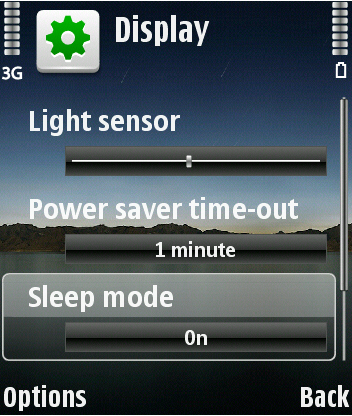
So, if you have a Nokia phone with a flashing blue LED on front, you can witch it off by going to Menu -> Tools -> Settings -> Phone -> Display -> Sleep Mode , then select OFF. This way, your display will show you the time, missed calls, etc.
It's interesting because on my phone this option is available only when Englis language si selected.

marți, 7 decembrie 2010

Webcam record utility

I tried to find a program that records video clips directly from your webcam , but my first search results were spam, more spam and a forum post that learned me to record directly from Microsoft Office Onenote. Unfortunately it has just one setting, and that is regarding the quality of the video, but if you have Microsoft Office installed,  it's right there for you.
Usage: Open OneNote (not that Sidenote from System Tray, then go to Insert -> Recording -> Record Video. I don't know where on the hard drive it saves the file, but after you finish recording you can right click the object and select a path for you new saved file.


Oh, when you press "record", a pop-up will apear with images from the camera. From this point, the recordin si on until you close the window. Neat!

joi, 28 octombrie 2010

Power surge prottection

Sometimes, when there is a voltage spike or power loss, the computers's power suplly protects itself by shutting down. This means you won't be able to turn the computer back on immediately after the power break.
What should you do: pull the power cord, ther press the computer;s power button. This will drain the remaining power stuck in your circutis . Then, plug in the power cable and you;re done.

Well, about Ubuntu

I just erased all Ubuntu partition, i have no patience left for dealing with it.
Anyway, if you have  Ubuntu on a laptopt and it goes to standby, good-bye WIFI connection. You have to kill the process and restart.
How easy is that?

miercuri, 13 octombrie 2010

Turn off Spelling check in Outlook 2010

Just follow these steps.

  1. Click the File tab, and then click Options.
  2. Click Mail , and then click Editor Options.
  3. Click to clear the Check spelling as you type check box. 
Simple as that!